
A roll-former can produce a lipped (S) or unlipped (U) profile shape. Operators may occasionally need to change the profile shape to meet a job's specifications.
TIP! If Factory2 shows a job in red, check the Profile ID for a stick. If the Profile ID is red, change the profile. See Checking the job file for steel and profile shape for info.
Operators change the profile shape by either engaging or disengaging the lipbox rollers.
How to change from lipped (S) to unlipped (U)
To change from a S to a U profile, disengage the lipbox rollers.
For F325iT and F325iT-L
Go to the Operator touchscreen:
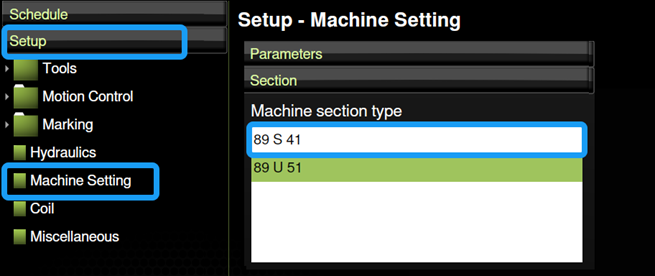
1. In Factory2, tap Setup > Machine Setting. Under Section, tap the U profile.
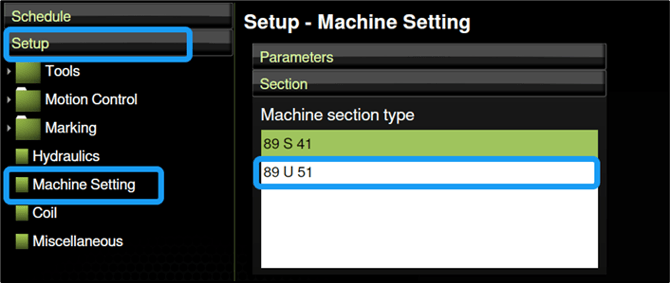
2. On the Operator touchscreen unit, press  (Software Reset button).
The U section type will turn green. The hydraulic system will disengage the lipbox rollers.
For F450iT
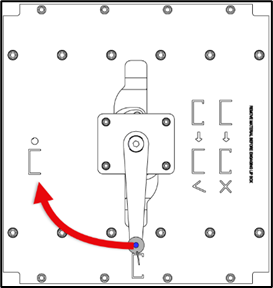
Open the sliding cover (Outfeed end), then:
1. Use the handle on top of the lipbox to move the rollers from lipped to unlipped.
3. On the Operator touchscreen unit, press  (Software Reset button).
How to change from unlipped (U) to lipped (S)
To change from a U to a S profile, engage the lipbox rollers.
NOTE! Always remove steel before engaging lipbox rollers.
Follow steps for removing current steel from roll-former then:
For F325iT and F325iT-L
Go to the Operator touchscreen:
1. In Factory2, tap Setup > Machine Setting. Under Section, tap the S profile
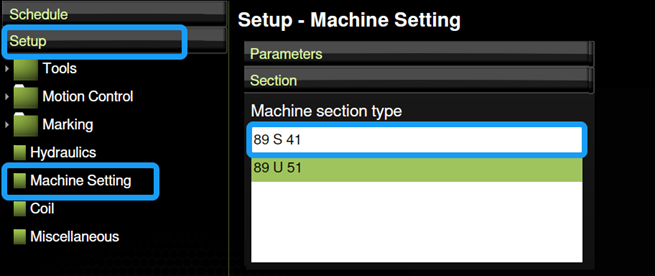
2. Press (Software Reset button) on the Operator touchscreen. The S section type will turn green . The hydraulic system will engage the lipbox rollers.
Now follow steps for feeding steel into the roll-former.
For F450iT
Open the sliding cover (Outfeed end), then:
1. Use the handle on top of the lipbox to move the rollers from unlipped to lipped.
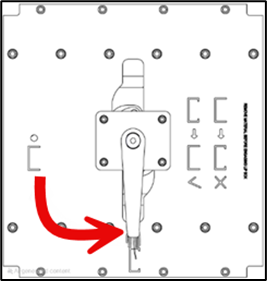
2. Close the sliding cover, go to the Operator touchscreen. In Factory2, tap Setup > Machine Setting. Under Section, tap the S profile. The S section will turn green.
3. On the Operator touchscreen, press  (Software Reset button)
Now follow steps for feeding steel into the roll-former.