
Operators must feed steel into the roll-former after loading a new coil on the decoiler or after completing a maintenance or troubleshooting task that required removing steel from the machine.
 DANGER! Always wear protective boots, cut-resistant gloves, and hi-vis clothing when handling or moving steel or steel coils.
Note - tools required: cutting tool (shears or electric nibbler)
Feed strip through Infeed and push to rollergang
Make sure the machine is in an Emergency Stopped state.
 DANGER! Loading steel requires access to machine danger zones. Do not proceed until the machine is in an Emergency Stopped state.
1. Cut the corners of the strip at a 45° angle to reduce risk of jamming.
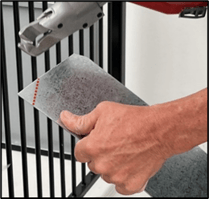
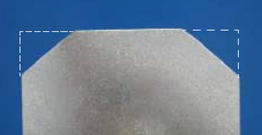
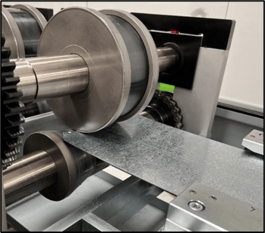
2. Carefully feed strip through Infeed rollers. (For F325iT/IT-L: feed strip through lubrication unit then Infeed rollers).
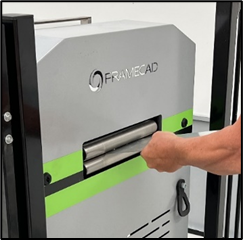
3. Check strip is centered and firmly place as you push.
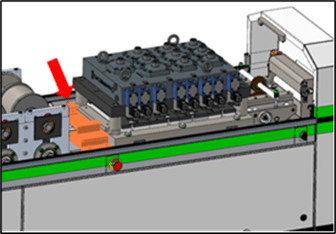
Move steel side-to-side. There should be little to no movement. If there is movement, open the sliding cover and adjust the Infeed guides (A). To adjust, loosen the locking screw (C) and turn the adjustment wheel (D). When steel is firm, unwind the wheel by 1mm (1/32”). The steel should not be hard up against the Infeed rollers. When finished, tighten the locking screw.
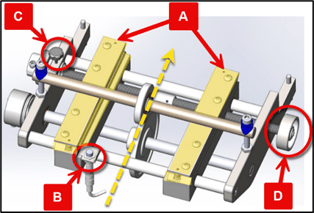
4. Push strip through toolblock. This requires additional strength.
NOTE! Resistance may indicate a jam. Pull steel out, check for bending, and try again.
5. Push strip through the first rollers in the rollergang and stop. Check steel is just touching the rollergang infeed guide (the guide between the toolblock and the rollergang). Make sure there is enough steel for the first rollers to pick up when inching the strip.
Inch strip to Outfeed and manually shear
To proceed, put the machine in Manual mode:
1. Twist an Emergency Stop button clockwise until it releases.
2. Go to the Operator touchscreen. Tap Acknowledge All in Factory2.
3. Press  (Safety Reset button) on the touchscreen. The machine is now in Manual mode.
4. Turn an Inch switch toward the Outfeed. The strip should move.
NOTE! If rollers turn, but the strip doesn't move, press Emergency Stop and push strip into first rollers in rollergang. Then repeat from step 1.
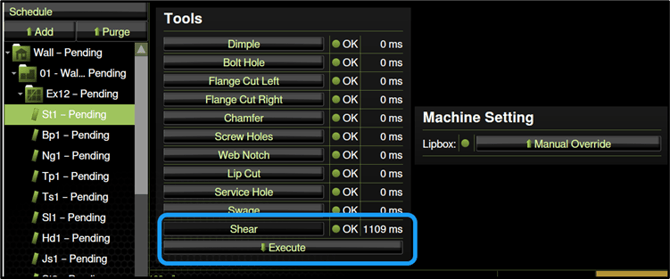
5. Continue inching the strip until it emerges 10cm (3/8”) from the Outfeed end. Then in Factory2, tap Return to get to the home screen (if necessary), and under tools tap Shear > Execute.
Enter coil information
Operators should enter information about a coil in Factory2 every time they change coils. This allows you to check that the steel in the roll-former matches the steel required in a job you load. It also allows Factory2 to track how much steel remains in a coil.
In Factory2, tap Setup > Coil. The Coil Data window appears.
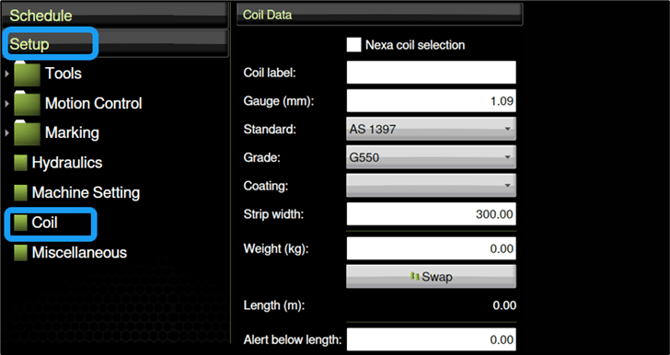
Tap a field or select a value to enter data.
| Field | Details |
| Coil label |
Enter an ID. Ask your organization how to identify coils. |
| Gauge (mm or mils) |
Enter the Base Metal Thickness (BMT). Do not enter the Total Coated Thickness (TCT). |
| Standard |
Select standard (e.g., AS1397, EN10346, etc.) |
| Grade |
Select grade (e.g., G550, S550GD, etc.) |
| Coating |
Select coating (e.g., Z100, Z450, etc.) |
|
Strip Width (mm or ") |
Enter strip width. |
|
Length (m or '/") |
New coil: enter value from mill certificate or coil label. |
|
Alert below length (m or ") |
Set alert to appear when steel from coil runs low. |
TIP! Refer to the coil's mill certificate for gauge, standard, and other data.