
Operators must remove steel from the roll-former when changing coils or when performing certain maintenance or troubleshooting tasks.
 DANGER! Loading, unloading, and moving steel require access to machine danger zones. Do not proceed until the machine is in an Emergency Stopped state.
DANGER! Always wear protective boots, cut-resistant gloves, and hi-vis clothing when handling or moving steel coils and steel strip.
Cut current steel at Infeed
Tip! Use an electric nibbler to cut the steel strip into a flat shape without waves.
1. Press an Emergency Stop button.
2. Cut the strip near the Infeed end. Cut the corners at a 45° angle to reduce risk of jamming.
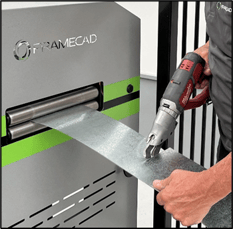
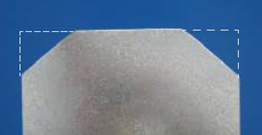
If the machine is set up to produce a lipped (S) profile, disengage the lipbox rollers. If the machine is set up to produce an unlipped profile, inch the steel out of the roll-former.
Disengage lipbox rollers (if required)
Disengage the lipbox roller if the machine is set up to produce a lipped (S) profile. This allows steel to be removed.
For F325iT and F325iT-L:
1. Twist an Emergency Stop button clockwise until it releases.
2. Go to the Operator touchscreen. Tap Acknowledge All in Factory2. The machine will now be in Manual mode.
3. On the Operator touchscreen, press  (Safety Reset button).
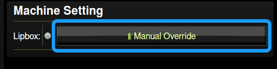
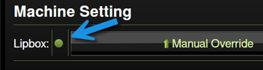
4. In Factory2, tap Return (if necessary) to go to the home screen, then tap Manual Override. The Lipbox indicator will turn grey.
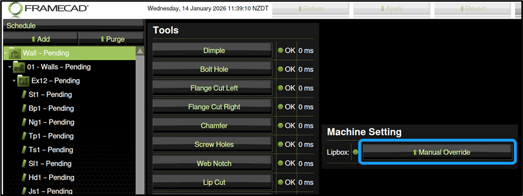
5. Check the lipbox to confirm it is disengaged.
You can now remove the steel using the Inch switch.
For 450iT:
1. Open the sliding cover (Outfeed end).
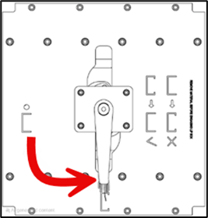
2. Use the handle to move the lipbox rollers from lipped to unlipped.
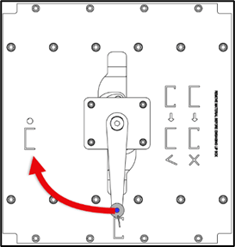
3. Close the sliding cover.
Inch steel out of the roll-former
Operators can remove steel once the lipbox rollers are disengaged.
NOTE! Check machine is in Manual mode (  +
+  are lit, solid) and Emergency Stop is disengaged before proceeding
Turn an Inch switch toward the Outfeed end and remove steel.

You can now re-engage the lipbox rollers.
Re-engage lipbox rollers (if required)
Engage the lipbox rollers if you will next produce a lipped (S) profile.
For 325iT and 325iT-L:
Go to the Operator touchscreen. In the Manual home screen in Factory2 tap Manual Override for the lipbox. The indicator will turn green.
For 450iT:
Open the sliding cover (Outfeed end) and move the handle from unlipped to lipped.
You can now feed new steel into the roll-former.