
Steelwise gives you flexibility for exporting a job file in different formats. Exported files are saved locally as set under Folder Settings Information (in the BSET dialog).
Summary of Steelwise export options
Click Steelwise > Exports in the Menu bar to find any export option.
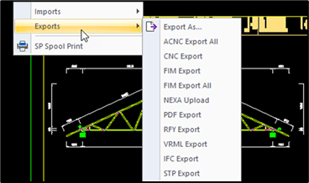
| Option | Use to export... |
| Export As... | in SVG, BMP, WMF, EMF, DWF, STL, DAE, DGN format. |
| ACNC Export | a CSV, XML (or other format) in a single file for all detail sheets. |
| CNC Export | a CSV or XML (or other format) for a selected detail sheet. |
| FIM Export | a FIM for a selected detail space (click a detail space, then click Steelwise > Exports > FIM Export). |
| FIM Export All | a FIM for all detail spaces. |
| IFC Export | an IFC of a 3D view in the Model space to a local drive. |
| Nexa Upload | an RFY of selected detail sheets to Nexa. |
| PDF Export | a PDF of selected layouts and detail sheets to a local drive. |
| RFY Export | an RFY of selected detail sheets to a local drive. |
| STP Export | a STP of a 3D view in the Model space to a local drive. |
| VRML Export | a WRL of a 3D view in the Model space to a local drive. |
| XLE Excel Export | an XLSX of job file data to a local drive. |
TIP! You can type commands (as described below) to export files.
Exporting detail sheets as a CSV, XML or other file
You can save detail sheets in CSV, XML or other formats (depending on your data file) using the ACNC or CNC command.
| • To export all detail sheets as a single file, type ACNC. |
| • To export one detail sheet as a single file, focus on the detail sheet and type CNC. |
Steelwise saves the file in the location specified for CNC Outputs (as set in BSET).
Exporting detail sheets as RFY files
To save wall, truss, or joist* detail drawings as RFY files:
| 1. Type RFY to save locally or type NEXAUPLOAD to export to Nexa. A dialog appears. |
| 2. (For NEXAUPLOAD) select the existing Nexa project to export the files to. |
| 2. Select which detail drawings to include from any Panel, Truss, or Joist space. |
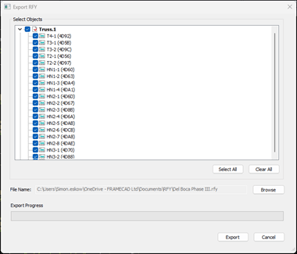 |
| 3. Click Export. |
*NOTE! You do not need to create a detail drawing for a deep-C joist to export it as a RFY file. Steelwise will export a deep-C layout from the Layouts space as a RFY when you use the RFY export commands.
Exporting layouts and detail sheets as a single PDF
To export selected layouts and detail drawings in one pdf:
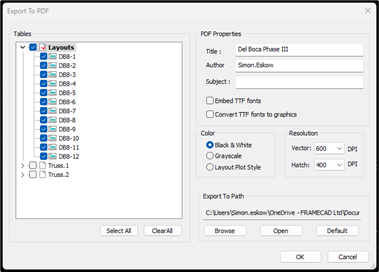
| 1. Type PDFSPOOL and press Enter. A dialog appears. |
| 2. Select each layout and/or detail to include in the pdf, and set a file location and other settings*, if required. |
 |
| 3. Click OK. |
*TIP! Select Embed TTF or Convert TTF fonts to graphics to ensure fonts will be printed correctly from another system even if that font is not installed. This is especially useful when printing a PDF from an Apple system.
Exporting a 3D view as a WRL
You can export a 3D view in the Model space as a WRL that can be used by third-party software (e.g., SAP Enterprise). In the Model space, type VRML.
Exporting a 3D view as an IFC
You can export a 3D view in the Model space as an IFC that can be used by third-party software (e.g. Tekla, Revit, SAP, BIM Vision, etc). In the Model space, type IFC.
Exporting project data as an Excel file
You can export job file data (see below for details) to a single XLSX file.
| 1. Type XLE and press Enter. A dialog appears. |
| 2. Enter a file name and location. |
| 3. Click Save. |
Steelwise saves the file to the specified location. The file includes the following tabs:
| Tab | Info |
|
Project Material Summary |
Meterage and estimated weight by plan (i.e., layout) |
| Plan Material Summary | Meterage, estimated weight and other details per frame, and frame count per layout |
| Frame Material Summary | Total meterage, estimated weight, and material type by frame |
| Sticks | Material type, estimated weight, and other details per stick |
| Openings | Opening dimensions, quantity and name by layout and frame |
| Accessories | Screws/fixings type and quantity by layout and frame |