
Truss settings (TSET)
| Command name: TRUSS_SETTINGS | Space(s): Layout space; detail spaces |
| Purpose: Framing settings for new* truss frames. | |
| Usage: | |
| 1. Type TSET and press Enter. A dialog appears. | |
| 2. Enter settings in the Layouts tab, Options tab, and Claddings tab as needed. | |
| 3. Click Save. | |
Additional info: • *TIP! Any changes you make in the TSET dialog will not affect existing trusses. Type LI and select a truss member to edit its settings. |
|
TSET Layouts tab
| Layouts Options | |||||||||||||||
| System Name | Specifies a data file to use for trusses. | ||||||||||||||
| Model Filter | Select Show Only Producible to limit the Model Name field to trusses that can be made with the roll-former selected in Machines Used. | ||||||||||||||
| Model Name |
Sets the material, profile size, and section orientation (i.e., inline or back-to-back) to use for trusses. |
||||||||||||||
| Machines Used | Sets the roll-formers that will be used to make the truss frames. | ||||||||||||||
| Roof Load | Sets the roofing material (e.g., tiles, sheets) that will be installed on trusses. | ||||||||||||||
| Roof Pitch | Sets the main roof slope as an angle, rise:run notation, or percentage. | ||||||||||||||
| Sub Pitch | Sets a secondary roof slope (i.e., hip or valley ends) as an angle, rise:run notation, or percentage. | ||||||||||||||
| Wind Speed | Specifies a wind speed to apply to trusses. Options are based on the Loading Design Code (as set in BSET). | ||||||||||||||
| Ground Snow Load | Sets the amount of pressure for snow load on a roof truss in kPa (metric) or psf (imperial). | ||||||||||||||
| Reduced Level | Sets the elevation of the roof system as measured from the ground to the bottom chord of the truss. Critical for detailing truss layouts in association with wall framing. Value must be < +/- 100mm (3 15/16") of wall height before loads are able to be transferred. | ||||||||||||||
| Hip Method |
|
||||||||||||||
| O/H Method |
|
||||||||||||||
| Eave Options |
|
||||||||||||||
| Layout Colour |
Sets the color to use for roof blocks.
|
||||||||||||||
| Heel Height |
Sets a truss heel height. Enter 0 to use automatic heel heights.
|
||||||||||||||
| Bracing Type |
Sets which strap type to use for bracing.
|
| Eave Settings | Only appears if you select Dropped Eave for Eaves Options. |
|
Sets the heights, setbacks and other configuration when using a trussed eave. |
|
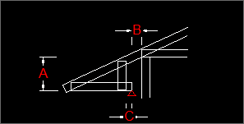
| Truss Spacings | |||||||
| Setout Type |
|
||||||
| Truss Spacing | Sets maximum distance between trusses; spaces the trusses based on the selected Setout Type. | ||||||
| First Truncated Truss | Sets the first truncated truss position (distance from the end wall to the truss' centerline/face). | ||||||
| Truncated Truss Spacing |
Sets what the maximum distance between the centerlines/faces of any two truncated trusses can be. |
||||||
| First Jack Rafter | Sets the first and second jack rafter (half truss) positions (distance from the hip end corner to the jack rafter's centerline/face). | ||||||
| Next Jack Rafter | |||||||
| Jack Rafter Spacing | Sets what the maximum distance between the centerlines of two jack rafters (half trusses). | ||||||
| Saddle Truss Spacing | Sets what the maximum distance between the centerlines/faces of saddle trusses can be. | ||||||
| Eave Search Distance | Sets the minimum distance between a roof support line and roof line for Steelwise to automatically add an eave (when you type TD). | ||||||
| Minimum Eave Length |
Prevents Steelwise from adding an eave less than this value. |
||||||
| Truss Offset | Sets trusses and jacks to be automatically cantilevered by this value from a selected support line. | ||||||
| Ceiling Ties | Sets the spacing of ceiling ties along a truss' bottom chord. Only used if Ceiling Batten Spacing (under Batten Spacings) is 0 or > than Ceiling Ties value, or if Suspended Ceilings (under Loads) is set to True. | ||||||
| Outrigger Spacing | Sets the spacing between outrigger members. Only applies when you select Outriggers for O/H Method. |
| Truss Spacing Types | |
| Standard Spacing Type |
Spaces standard trusses evenly across area up to maximum distance set in Truss Spacings, or spaces at maximum distance, but with a Centre Gap, Starting Gap, or Finishing Gap. |
| Trunc Absolute Spacing |
Select True to space members at maximum distance set under Truss Spacings. Select False to space members evenly across available area (up to the maximum set under Truss Spacings). |
| Jack Absolute Spacing | |
|
First Truncated as Girder |
Replaces the first truncated truss at the hip end with a girder. Consequently, web members will be aligned with the oncoming hip end trusses and loads will be calculated using Additional Area method. Use this for roofs with heavy loads or when supported jack rafters are cantilevered past the support line. |
|
Hip Jack as Girder |
Replaces rafters at the hip end with a girder. |
|
Trusses Use Nominal Spacing |
Uses Truss Spacings settings for truss engineering instead of actual spacing when you type TD to input a truss. |
|
Jacks Use Nominal Spacing |
|
|
Crown Truss Option |
Adds a crown to the inside, centerline, or outside of the truss apex, or no crown. |
| Truss Directions (Only appears if a B2B system is selected for Model Name.) | ||||||||
|
Allows you to set the direction for each kind of truss (i.e., truncated, crown, standard, jack, etc.) if you're using a back-to-back truss system.
NOTE! Raise a ticket to request FRAMECAD make truss directions settings the default in your data file. |
| Tooling Options |
| See Panel settings command for info. |
| Batten Spacings | |
|
End Roof Batten Spacing |
Sets the maximum distance allowed between the first (closest to eave) batten and the next batten. (Value is usually < Int Roof Batten spacing.) |
|
Int Roof Batten Spacing |
Sets the maximum distance between next battens. (Used for engineering calculations and total batten quantities.) |
|
Ceiling Batten Spacing |
Sets the maximum distance between ceiling support battens under a truss. Value is also used in engineering calculations for any battens specified in Ceiling Batten Settings. |
| Roof Batten Settings | |
|
First Batten Type |
Specifies the material/product that will be used for the first (closest to eave) roof battens. |
|
First Batten Length |
Sets the finished cut length of first roof battens (used for BOM calculations). |
|
First Batten Lap |
Sets the maximum distance that two first battens can overlap (used for calculating required quantity). |
|
First Fixing Type |
Specifies the type and number of screws to use per connection to truss. |
|
First Fixing Qty |
|
|
Next Batten Type |
Specifies the material/product to use and type and number of screws per truss connection and sets the finished cut length and overlap (for BOM calculations and quantity) for next battens. |
|
Next Batten Length |
|
|
Next Batten Lap |
|
|
Next Fixing Type |
|
|
Next Fixing Qty |
|
Ceiling Batten Settings |
|
| End Ceiling Batten | Specifies the material/product that will be used for the first (closest to wall) ceiling battens. |
| Material Length | Sets the finished cut length of end ceiling battens (used for BOM calculations). |
| Lap Allowance | Sets the maximum distance that two end ceiling battens can overlap (used for calculating required quantity). |
| Int Ceiling Batten | Specifies the material/product that will be used for interior (not closest to wall) battens and sets their final cut size and maximum overlap (for required quantity and BOM calculations). |
| Material Length | |
| Lap Allowance | |
| First Fixing Type | Specifies the type and number of screws to use for end ceiling battens per truss connection. |
| First Fixing Qty | |
| Next Fixing Type | Specifies the type and number of screws to use for interior (next) ceiling battens per truss connection. |
|
Next Fixing Qty |
|
Valley Supports |
|
| First Valley Support |
Specifies what batten type will be used to support one side of a gutter in a valley. |
| Material Length | Sets the finished cut length of the first valley support batten (used for BOM calculations). |
| Lap Allowance | Sets the maximum distance that two first valley supports can overlap (used for calculating required quantity). |
| Next Valley Support | Specifies what batten type will be used to support the second side of a gutter in a valley and sets its finished cut length and maximum overlap (for BOM and quantity calculations). |
| Material Length | |
| Lap Allowance |
|
Solar Panels |
|
| Sets the panel dimensions, pane weight in kN/m2 (metric) or psf (imperial), and quantity, and the color and text to use for labelling. | |
| Roof Panel Options | |
| Sets the roof panel parameters for when you select Panel Jack for Hip Method. | |
TSET Options tab
| Height Split Options | |
|
Max Height |
Sets the maximum height allowed for a truss to be split horizontally into a main truss and top hat truss. tk |
|
Required Gap |
Sets the required distance between the top and bottom half of a split truss. This is generally equal to the depth of the battens that will be used to attach the top hat to/restrain the main truss. |
| Labels Options | |
| prefixes for labels |
Sets the prefix to use in labels for various trusses, girders, rafters, gable frames, and other members. |
| Continuous Numbering | Select True to start from 1 and continue for all truss types. Select False to start from 1 then restart for each truss type. |
| Auto Label Layout | Automatically inserts a label when you input a truss. |
| Restart Label Zones | Restarts truss numbering per zone (if zones are set). |
| Use Individual Labels | Includes a unique number for each truss (instead of one number for multiple trusses of identical type and dimensions) in labels in a truss layout. |
| Report Options | |
|
report items |
Includes information about truss sites (brackets and fixings); roof bracing, roof battens, and valley supports (including brackets and fixings); and ceiling battens when you run a truss layout report. |
|
Minimum Uplift Value |
Excludes the uplift value from a truss uplift report for any member that is below the set value. |
|
Detail Sheet Options |
(Sets info to include in drawing sheets in truss detail spaces) |
||||||
|
Include Materials |
Adds a bill of materials to the top of truss detail sheets. |
||||||
|
Collect Common Lengths |
Shows a quantity of members of the same length (instead of listing each member with its length separately). |
||||||
|
Include Parts |
Lists members in the BOM (and labels members in the elevation view) by common length (instead of listing/labelling each member separately). |
||||||
|
Include Design Summary |
Shows design and load codes, wind speed, and other truss design parameters (at bottom of detail sheet). |
||||||
|
Show Major Dimensions |
Includes dimensions for overall size, layout, and geometry. |
||||||
|
Show Minor Dimensions |
Includes size, position and spacing of components. |
||||||
|
Show Engineering Percentages |
Shows what percentage of the truss frame’s load capacity is being used (instead of just Pass or Fail). Greater than 100% counts as an engineering failure. |
||||||
|
Show Uplifts |
Includes uplift values for truss members. |
||||||
|
Border Sized to Fit |
Sizes each border independently (instead of using the largest size required for all borders). |
||||||
|
Auto Update Supports |
Sets Steelwise to update the relevant layout when you add a support line to a truss detail sheet by typing TAS. |
||||||
|
Dimension Style |
|
||||||
|
Engineering Detail Report |
|
||||||
|
Label All Sticks |
Includes an ID for every stick (instead of only major sticks) in the elevation veiw in the detail sheet. |
||||||
|
Show Stick Labels |
Includes an ID for every stick in the material summary at the top of the detail sheet. |
| Dimension Options | |
| Linear Dimensions |
Generates dimensions by measuring between or to truss/floor center lines, front/rear edges, or from a selected point to the near or far side of a truss or floor. |
| Ordinate Dimensions | |
| Width Options | Sets Steelwise to show frame widths when you type DM and sets the minimum length a member must be to show its width. |
| Filter Options |
| Sets the default filters that apply when you type TTD. Filters can be changed at any time. |
| Connection Options |
| Sets the data file used to define brackets, includes a separate connection plan, and adds connection parts drawings. |
TSET Claddings tab
| Claddings Options | |
| System Name | NOTE! Claddings options are generally outside the scope of LGS/CFS frame production. |
| Roof Sheet | |
| Curved Sheet | |
| Insulation | |
| Construction | |
| Curved Sheet Radius |
| Flashing Options | |
| Guttering | NOTE! Flashing options are generally outside the scope of LGS/CFS frame production |
| Fascia | |
| Valley Guttering | |
| Barge Capping | |
| Hip Capping | |
| Ridge Capping | |
| Downpipes | |
| Apron Flashing | |
| Soaker Flashing | |
| Curved Valley | |
| Curved Valley | |
| Curved Barge | |
| Curved Soaker | |
| Select Flashings by Points |
|
Settings for Roof Sheet, Curved Sheet, Guttering, Fascia, Valley Guttering, Barge Capping, Hip Capping, Ridge Capping, Apron Flashing, and Soaker Flashing |
|
|
Sets the tolerance (allowed variation in length or curvature), overlap length for and segment length (excluding roof and curved sheeting). |