
You must check truss, wall, and joist settings and change settings (if required) before you begin detailing wall panels or truss or joist frames. This ensures that you will correctly model your structure and that members (i.e., profiles or sticks) will ultimately be produced correctly.
NOTE! For System or System Name settings, select the data file appropriate for your FRAMECAD® roll-former(s). Contact your FRAMECAD Customer Success Coordinator with questions.
Check truss settings
Always check truss settings first. Truss settings, such as wind speed and roof loads, affect wall panel settings.
| 1. Type TSET and press Enter. A dialog appears. |
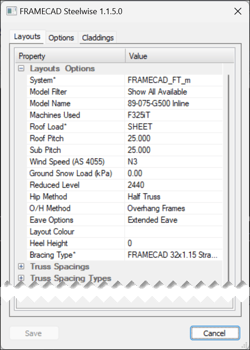 |
| 2. Check or change these common settings in the Layouts tab (see complete TSET settings): |
|
• System - the relevant data file. |
| • Model Name - the material specification and orientation of truss members. |
|
• Machines Used - the type of roll-former that will be used to produce truss members. |
|
• Roof Load - the type of roofing material (e.g., tiles, sheets) that will be used on trusses. |
|
• Wind Speed - should match the wind speed set in BSET. |
|
3. Make any other changes as required. Click Save to save changes. |
Check panel settings
Check panel settings after you check truss settings and before you start creating wall layouts.
|
1. Type PSET and press Enter. A dialog appears. |
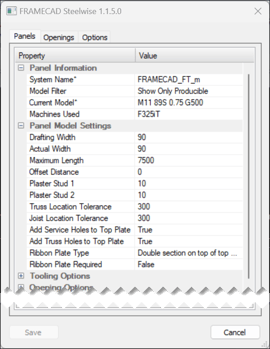 |
| 2. Check or change these common settings in the Panels tab (see complete PSET settings): |
| • System Name - the relevant data file. |
| • Current Model - the material specifications of wall panel members. |
| 3. Make any other changes as required. Click Save to save any changes. |
Check joist settings
Check joist settings after you check truss settings and before you start creating floor layouts.
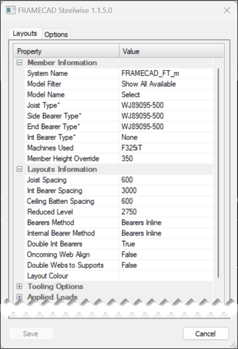
| 1. Type JSET and press Enter. A dialog appears. |
 |
|
2. Check or change these common settings in the tab (see complete JSET settings): |
| • System Name - the relevant data file. |
| • Model Name - the material specification for joists and the joist system (e.g., webbed joist, deep-C) to use. |
|
• Joist Type, Side Bearer Type, End Bearer Type, Int Bearer Type – material to use for specific joists and joist members (as required for the selected Model Name). |
|
• Member Height Override – height of webbed joists if not using automatic height. |
| 3. Check or change these common Layouts Information settings in the Layouts tab: |
| • Joist Spacing, Int Bearer Spacing, Ceiling Batten Spacing, as required. |
| • Reduced Level – distance from ground to top side of top chord. |
| 4. Make any other changes as required. Click Save to save any changes. |