
Offset is the distance between a tool and the row of tools closest to the Infeed (also called datum tools). Tools in the first row have an offset of 0. The tool closest to the Outfeed (the Shear tool) has the highest offset. Offsets are specific to each roll-former model and are set by FRAMECAD.
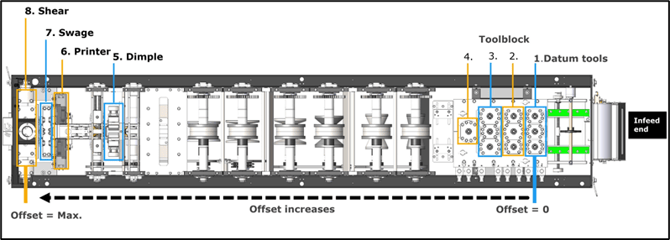
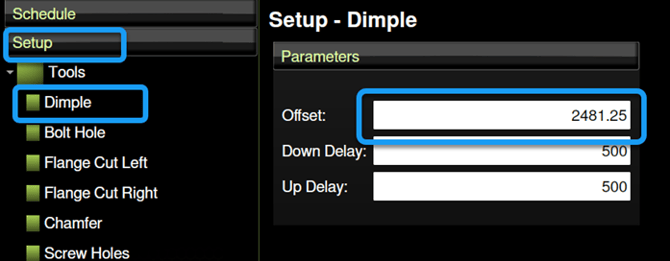
TIP! To view a tool’s offset, in Factory2, tap Setup > Tools, then tap the tool. A Parameters window appears showing its Offset and other values.
Operators typically troubleshoot an offset issue if they measure an incorrect dimple offset during a production quality check.
Identifying the cause of an incorrect offset
An incorrect offset can indicate an encoder issue or a loosened tool. To identify the cause:
1. Check the stick length. If incorrect, see Correcting a stick length issue.
2. Check the tool. If loose, tighten it, then recalibrate its offset.
How to recalibrate a tool offset
To recalibrate a tool offset, create a manual stick with a tool operation at specific positions, measure the distance of each position to the closer end of the stick, then use those measurements to figure out how much to adjust the offset.
NOTE! Recalibrate one tool offset at a time. Recalibrating multiple offsets simultaneously may result in calibration error.
Note – tools required: calculator, marker pen, measuring tape, vernier calliper
Set up and create a manual stick
In Factory2:
1. Tap Add > Create Manual Stick > Load Job.
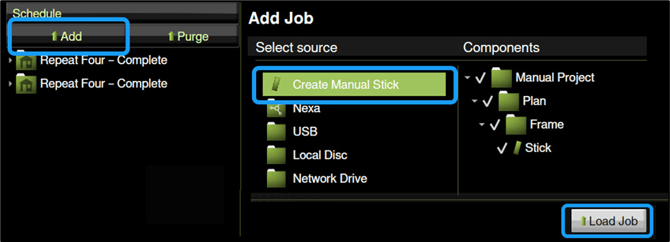
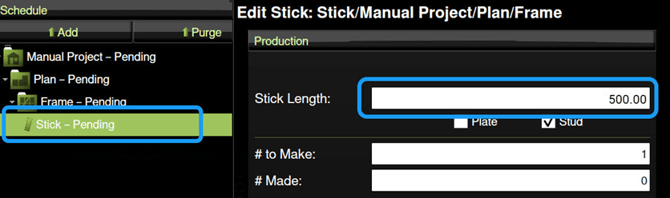
2. Select a stick. The Edit Stick window appears. Under Production, enter a stick length. 500mm (20”) length is sufficient.
3. Set a tool to operate at two positions at the same distance from each end of the stick: Under Tooling, add a tool, then enter a position near the leading end of the stick. Add the tool again*, and enter a position near the trailing end of the stick. (Scroll down for suggested positions.)
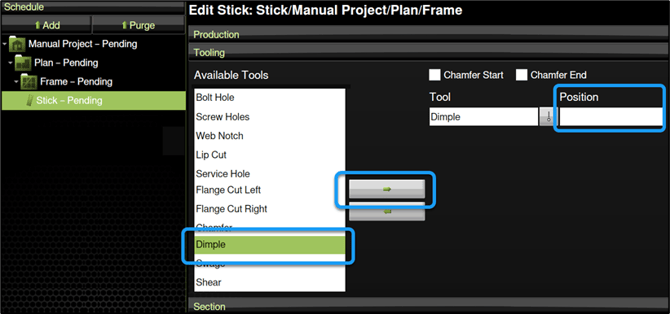 *Do not add a second position for web notches.
| Suggested positions for a 500mm (20") stick | ||
| For this tool... | Set first position at... | Set second position at... |
|
Dimple |
20mm |
480mm |
|
Screw Hole |
20mm |
480mm |
|
Service Hole |
40mm |
460mm |
|
Web Notch |
250mm |
n/a |
Note! Tool configurations may vary. Make sure you position any punch or screw hole operation equidistantly to avoid conflict with other tool operations.
Tap Apply to save changes.
4. Create the stick. Use the marker pen to draw an arrow in the direction of the steel. The image below illustrates positions of tool operations.
Measure and calculate values to get corrected offset
For the tool you are recalibrating:
1. Measure the distance from the stick’s leading end to the hole in the first position. (For a web notch, measure from stick’s leading end to the closer edge of the notch). Call this A.
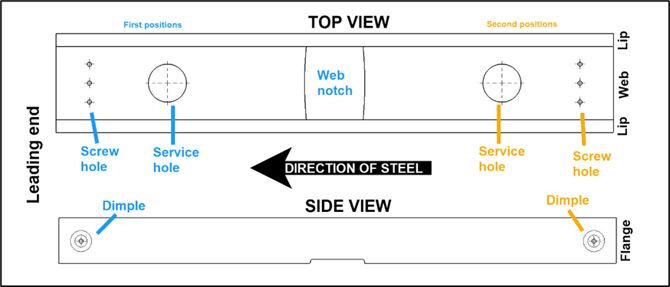
2. Measure the distance from the stick’s trailing end to the hole in the second position. (For a web notch, measure from stick's training end to the closer edge of the notch). Call this B.
3. Subtract the lower measurement from the higher measurement, then divide by 2, to get the adjustment value. Then add or subtract the adjustment value to from the current offset based on these rules:
For a datum tool (i.e., tool in row closest to Infeed) or shear tool
| If A > B |
Add: current offset + adjustment value = corrected offset |
| If A < B |
Subtract: current offset – adjustment value = corrected offset |
For any other tool
| If A > B |
Subtract: current offset – adjustment value = corrected offset |
| If A < B | Add: current offset + adjustment value = corrected offset |
Enter corrected offset in Factory2
In Factory2, tap Setup > Tools and tap the tool you are recalibrating. A Parameters window appears. Enter the new offset, then tap Apply.
Set up a second test stick, operate the tool at two positions (or one position for a web notch), and measure. The distances between the positions and the stick ends should now be equal.
Example calculation
In this example, we are correcting a dimple tool offset:
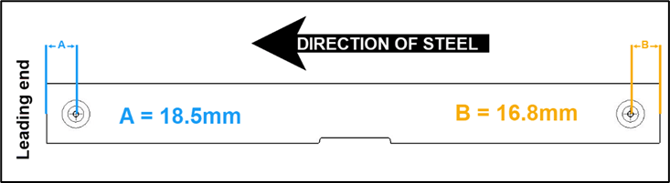
1. We measure the distance from the leading end to the first dimple as 18.5 mm. A = 18.5mm
2. We measure the distance from the trailing end to the second dimple position as 16.8mm. B = 16.8mm
3. We subtract the lower value from the higher value then divide by 2 to get the adjustment value: (18.5mm - 16.8mm )/2 = .85mm. Adjustment value = .85mm
Since a dimple tool is neither a Datum tool nor shear, and since A > B, we subtract the adjustment value from the current offset to get the corrected offset. So, if our current offset for the dimple is 2481.25mm, then: 2481.25mm - .85mm = 2480.4. Corrected offset = 2480.4
Now we can enter the corrected offset in Factory2.