
Steelwise can check if a selected opening has sufficient strength to resist bending and deformation due to wind, and to automatically add a horizontal stiffening member to the head and/or sill, if required.
Checking the head or sill of an opening
In the Layouts space:
| 1. Type LI and press Enter. |
| 2. Select an opening in a wall layout and press Enter. A dialog appears. |
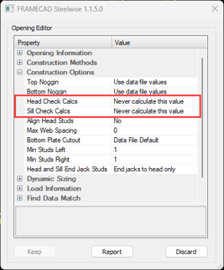 |
| 3. Select Always calculate this value for Head Check Calcs and/or Sill Check Calcs. |
| 4. (Optional) Set Steelwise to automatically add stiffeners if required (see below). |
| 5. Click Keep. |
The checks will now be included in the Opening Engineering Report.
Automatically adding stiffeners
After selecting Always calculate this value for Head Check and/or Sill Check calcs:
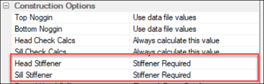
| 1. Select Stiffener Required for Head Stiffener and/or Sill Stiffener. |
 |
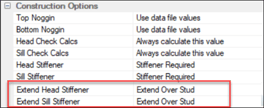
| 2. Now set if the stiffener(s) will end at or extend over jamb studs. |
 |
| 3. Click Keep. |
Doing head and sill calcs by default
Customers can make the head and sill calculations the default setting via their data files. Raise a ticket in Communities if you’d like FRAMECAD® to make this a default setting in your data file.