
The machine uses an encoder wheel to record the stick length. An incorrect stick length may indicate an encoder wheel problem.
If the Stick Length value in Factory2 for your test stick did not match your measurement, adjust the encoder in Factory2, then run a second test stick to confirm the machine is in error.
How to confirm a machine measurement error
In Factory2:
1. Tap Setup > Motion Control > MDX61B. Note the Last Length field. This is the length the machine recorded for your first test stick.
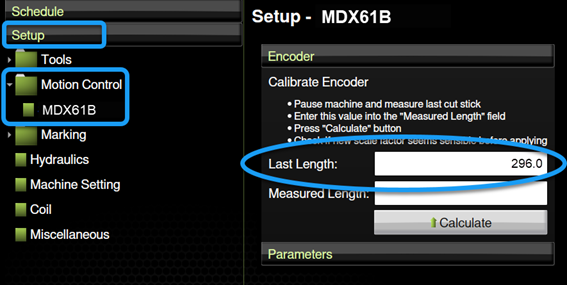
2. Enter your first test stick measurement in the Measured Length field then tap Calculate.
3. Create a test stick, measure its length, and compare your measurement to the Stick Length value in Properties > Production for that stick.
If the Stick Length value and measurement match, continue with your production day.
If the Stick Length value does not match the stick length, the encoder wheel may be “slipping” (i.e., moving inconsistently with the steel). This is typically due to a loose encoder wheel screw or loose top pressure wheel shaft.
How to check and correct for a loose encoder or top pressure wheel
To check for a slipping encoder wheel:
1. Open the sliding cover (Infeed end).
2. Turn the encoder wheel and top wheel.
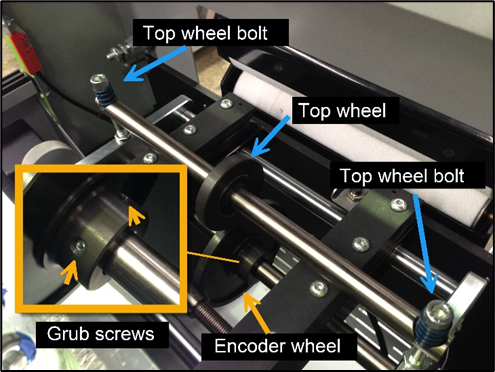
If you can turn the top wheel (pressure wheel) easily, tighten the top wheel bolts. You should only be able to turn the top wheel with effort.
If the encoder wheel is loose on its shaft, tighten the grub screws. The encoder wheel should be locked to the input shaft.