
A difference in width between one lip and the other often indicates that the steel strip is not centered. Operators can recenter the strip by loosening the rollergang infeed guides and then adjusting the main infeed guides.
Note – tools required: 6mm hex key, spanner or wrench set, vernier calliper
Open the sliding cover (Infeed end), then:
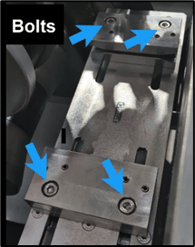
1. Locate the rollergang infeed guides. Use the 6mm hex key to loosen the four guide bolts. Separate guides slightly to take pressure off steel.
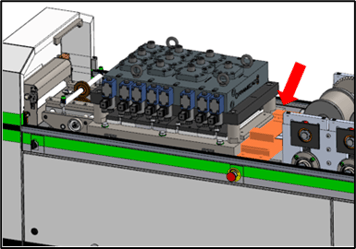
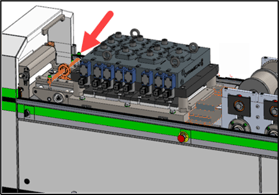
2. Locate the main infeed guides. To adjust the guides (A): loosen the bolt on the adjustment wheel (C), loosen the locking screw (B), hold the end of the adjustment wheel rod (D) firmly, then turn the adjustment wheel (C) to move the guides the relevant distance.
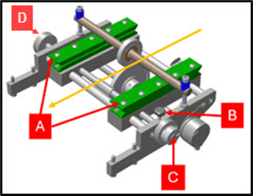
| If the right lip is too wide | Turn adjustment wheel clockwise |
| If the left lip is too wide | Turn adjustment wheel counterclockwise |
3. Tighten the bolt on the adjustment wheel, tighten the locking screw, then push the rollergang infeed guides so they are firm against the strip, tighten rollergang guide bolts.
Run another test stick and measure the lip widths. If the lips are equal, proceed with production.
If the widths are not equal, repeat from step 1.